We’ve got another round of enhancements in ForecastWatch. Login now to begin to use them.
Station code notices — renames no longer interrupt collection or scoring
When an airport’s ICAO code officially changes and a provider’s feed still refers to the former code, ForecastWatch now matches the feed to the current station automatically and says so plainly. The daily Quality Digest gains a “Station Code Notices” section reading, for example: “KPBI renamed to KDJT. Your feed still refers to the former code KPBI; we matched it to the current station, so your forecasts are collected and scored normally. Please update your feed to KDJT.”
The same notice replaces “No forecast received” on the Data Issues tab. Forecasts collected this way are scored normally under the current station, so a rename no longer creates a coverage gap while a provider’s upstream catches up. The matching always tries the current code first and never fires when another station owns or has shared the former code, so a reassigned code can never attach the wrong airport’s forecast.
Sharing policy on Data Export, spelled out in plain language
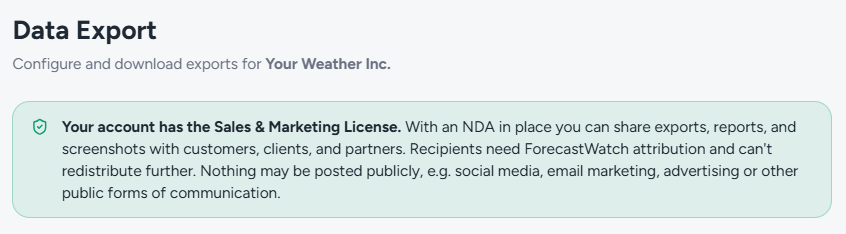
The sharing-policy notice on the Data Export screen now states the public-posting rule in concrete terms: nothing may be posted publicly, e.g. social media, email marketing, advertising, or other public forms of communication. Licensed and unlicensed accounts read the same closing sentence, and the Government Comparison shareability tooltip uses the identical phrasing, so the rule reads the same everywhere it appears on the ForecastWatch platform.
The rest of the policy is unchanged: exports, reports, and screenshots remain shareable freely within your own organization, the Sales & Marketing License covers sharing with external customers, clients, and partners under NDA, and Government Comparison reports remain shareable without a license or NDA.
Monthly exports now carry market context
Monthly CSV and Excel exports from the ForecastWatch platform now include the anonymous market benchmark columns customers already see on the Monthly Insights screens. Every station row carries Market Best, Market Worst, Market Mean, and Provider Count, computed from the same queries that power the station map, so the numbers in the download match the numbers on screen.
In Excel exports, the Summary and States sheets additionally carry your Percentile within each region’s market, matching the Regions drill-down. The Market filter on the Data Export screen now applies to monthly exports: the default is your primary market, and choosing All Markets benchmarks against every provider we track.
Each export’s metadata block states which market the statistics were computed against, and the built-in Data Dictionary sheet documents every new column, as does the methodology Data Dictionary page. Exports contain only anonymous market aggregates, never other providers’ names or individual scores.
Clear errors for malformed API query parameters
API endpoints that take integer query parameters (days_out, country, state, month, days, limit) now respond to non-integer values with HTTP 400 and a message naming the offending parameter, for example “Invalid days_out parameter: expected an integer, got ‘1-5’.” This covers the monthly insights, trends, market position, government comparison, watchlist, export, and reference endpoints.
A malformed value previously produced a generic server error, and on a few endpoints it was silently replaced with the default, so a request for a day range could return day-1 data with no indication anything was wrong. API integrations now get an immediate, actionable error, and results always reflect the filters actually applied.
Consistent metric names on every screen
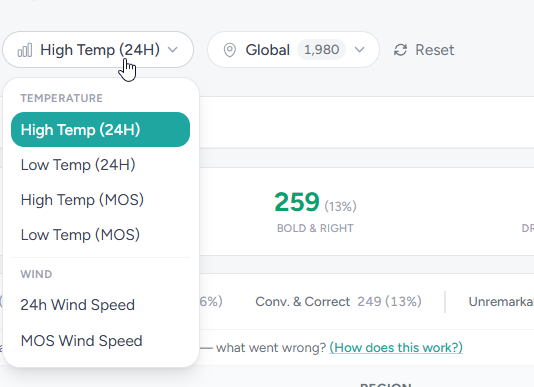
Temperature metrics are named the same way everywhere on the ForecastWatch platform: High Temp (MOS), Low Temp (MOS), High Temp (24H), and Low Temp (24H) appear consistently in dropdowns, page headings, summary cards, station drawers, and watchlist cards. The metric dropdown on Forecast Risks now groups its options under Temperature and Wind section titles, matching the pickers on Daily Insights and Monthly Insights.
Wind metrics remain labeled by what they measure: Forecast Risks and Daily Insights say Wind Speed, since those metrics cover speed only. Export file contents are unchanged: CSV column headers and XLSX sheet names keep their existing metric names, so automated parsers keyed on those names are unaffected.